An Introduction to Number Systems
Welcome to the first lecture in this Digital Logic Design series. Before we touch a single logic gate, flip-flop, or circuit, we need to get comfortable with something that sits underneath all this, and that is how computers represent numbers!
Computers represent numbers using number systems, and this brings us to the question that what are number systems?
A number system is just a method for writing down and representing quantities, it is a fixed set of symbols, plus a rule for how those symbols combine to represent any value we want. Every number system needs fundamentally two things:
- A set of digits (symbols) it is allowed to use
- A rule for how the position of each digit affects its value
That second part is what makes it a positional number system. We will build the concept of number systems as we explore different number systems in our course.
It might seem like an odd place to start as one might think that real digital logic is about circuits, not arithmetic, but every gate we’ll build, every truth table we’ll write, and every circuit we’ll design in this series operates on binary values. If we don’t have a solid, intuitive grip on binary and how it relates to the decimal numbers we already think in, and the hex/octal shorthand we’ll see constantly in datasheets, memory addresses, and code, everything that comes after will feel like memorization instead of understanding, so this lecture builds that foundation.
What a Number System Really Is
Lets start with a number system we are already super comfortable in like decimal. When we write 347 it actually means:
3 hundreds + 4 tens + 7 ones
= 3×100 + 4×10 + 7×1
= 347
The key idea, which we already use every single day without noticing is that the value of a digit depends on where it sits. A “3” in the hundreds place is worth 300 while the same “3” in the ones place is worth 3. This concept is called positional notation, and it is the entire foundation of every number system, including binary, octal, and hexadecimal.
Decimal uses base 10, meaning there are 10 possible digits (0 to 9), and each position is worth 10 times the position to its right (…thousands, hundreds, tens, units). Nothing about that “10” is special , it is just the number of digits we chose. We could build the exact same kind of system with any base:
- Base 2 (binary): only 2 digits (0, 1). Positions are worth 1, 2, 4, 8, 16, 32…
- Base 8 (octal): 8 digits (0–7). Positions are worth 1, 8, 64, 512…
- Base 16 (hex): 16 digits (0–9, then A–F for 10–15). Positions are worth 1, 16, 256, 4096…
We will see further in this series that every conversion trick is just applying digit value which depends on position where each position has different position-weights.
Why Computers Use Binary At All
This is worth understanding before we memorize a single conversion rule, because it explains why we are learning this instead of, say, base-10 circuits.
A transistor which is the tiny switch that everything in a computer is built from, is naturally good at exactly one thing and that is being either on or off. These are its two states. Building a transistor that sits at exactly one of ten different voltage levels (to directly represent a decimal digit 0 to 9) is quite hard as the tiny voltage differences between a 4 and a 5 would get wiped out by ordinary electrical noise, heat, or other imperfections. So two states, with a big voltage gap between “off” and “on,” is more reliable and easier to understand plus manufacture.
So binary isn’t just a random choice, it’s a direct consequence of the nature of a switch. Every other number system we will use (hex, octal) exists for convenience layered on top of this underlying binary reality as the hardware itself only ever sees 1s and 0s!
Counting in Binary
In decimal, each position is worth 10× the one before it because we have 10 symbols (0–9) before we are forced to roll over into a new position.
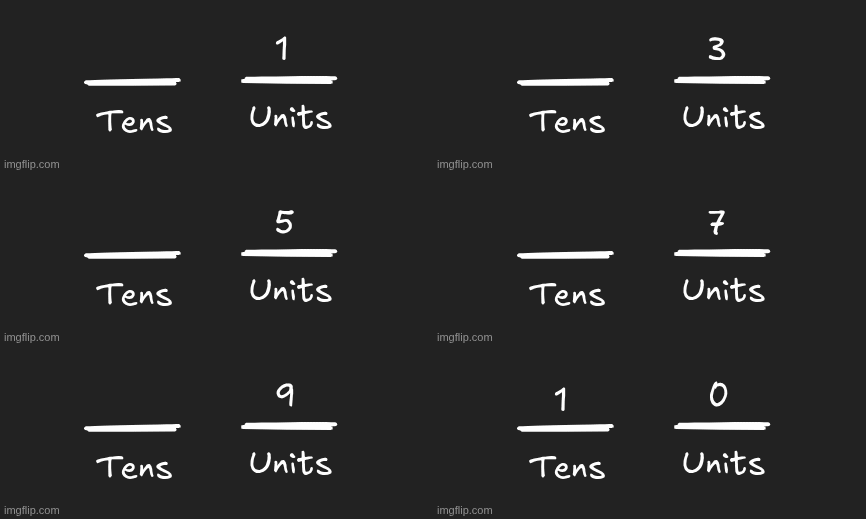
In binary, we only have 2 symbols which are 0 and 1, so you roll over into a new position twice as fast, every 2 counts instead of every 10.
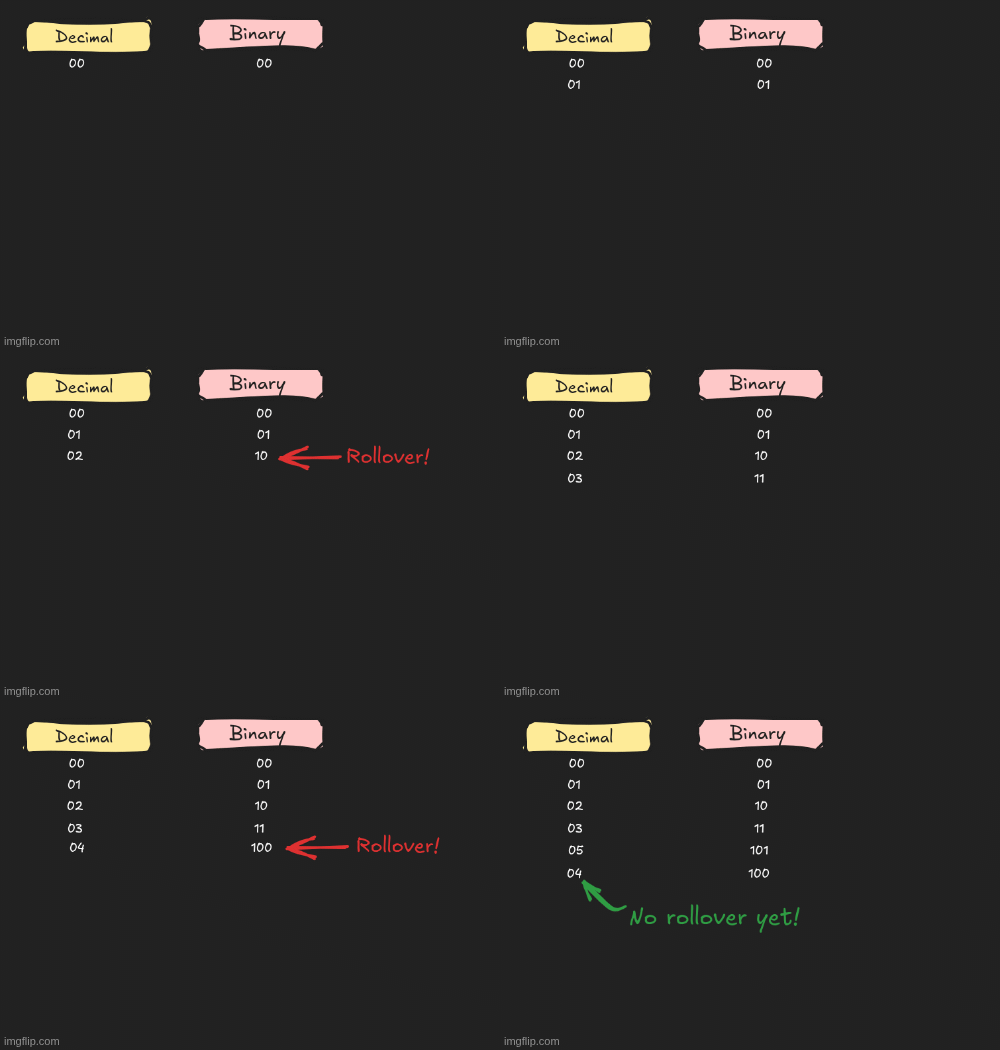
In binary the maximum number is 1, and the lowest 0 of course, so as soon as we hit the lowest that is 0, we go to the highest that is 1, when we hit the highest, we don’t have anything higher so we turn around to the lowest that is 0! However, we don’t just keep toggling around the numbers in the same place, once we encounter the highest possible number, we jump to the next position. It might sound confusing for now, but soon it will become crystal clear.`
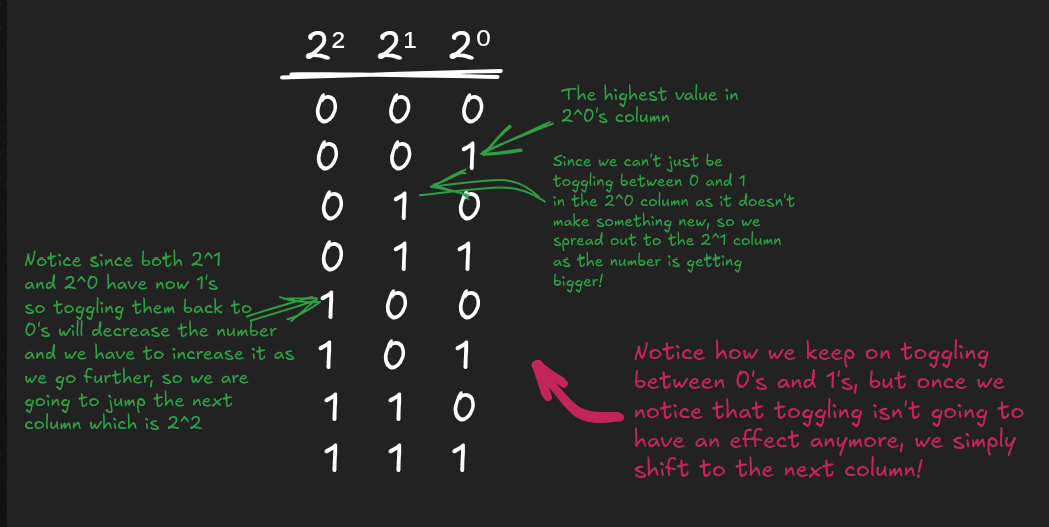
Start at position 0 (rightmost) with a value of 1. Each position to the left is worth 2× the position before it, because that’s how many counts it takes before that position needs to increment:
2⁰ = 1
2¹ = 2
2² = 4
2³ = 8
2⁴ = 16
2⁵ = 32
2⁶ = 64
2⁷ = 128
Compare to decimal, where each position is 10× the last (1, 10, 100, 1000…) for the exact same reason you just have 10 symbols instead of 2, so each position holds 10× as many counts before rolling over.
Walking through the counting table
This is where it actually all makes sense, see what happens at each step, especially the rollovers.
2³ 2² 2¹ 2⁰
0  0  0  0 = 0
0  0  0  1 = 1     ← rightmost bit went 0→1
0  0  1  0 = 2     ← rightmost bit rolled over (1→0), next bit incremented (0→1)
0  0  1  1 = 3     ← rightmost bit went 0→1 again
0  1  0  0 = 4     ← rightmost bit rolled over, second bit rolled over too, third bit incremented
0  1  0  1 = 5
0  1  1  0 = 6
0  1  1  1 = 7
1  0  0  0 = 8     ← three rightmost bits all rolled over, fourth bit incremented
This is exactly the same mechanic as decimal rolling from 9 to 10, or 99 to 100, a digit hits its maximum allowed symbol, rolls back to 0 and then forces the next position over to increment. In decimal that maximum is 9 (10 symbols, 0–9). In binary the maximum is just 1 (2 symbols, 0–1). Notice that each position has a weight, we don’t just randomly keep toggling 0’s and 1’s in a sequence, but we do so according to a rule.
For example, if we have to make the number 7, we will tick the columns where the numbers when added together can make the number 7! We know the positions increase by a factor of 2^n. So,
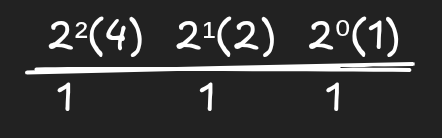
We see which columns or positions have 1’s ticked in them. Here we have a 1 in 4’s position, 2’s position and 1’s position, so we are going to add the positions. That is going to be 4+2+1 that is 7!
Why 0010 equals 2
Line the bits up under their position values and multiply, same as we did for decimal:
Position value:   8   4   2   1
Bit:              0   0   1   0
Contribution:     0   0   2   0
Add the contributions: 0 + 0 + 2 + 0 = 2. The only bit that’s “on” is the one sitting in the position worth 2, so the value is 2. Nothing more mysterious than that, it is the same weighted-sum idea, just with binary’s position values instead of decimal’s.
Lets take another example of 1000
Position value:   8   4   2   1
Bit:              1   0   0   0
Contribution:     8   0   0   0
Only the “8” position is on so value is 8. This is why 1000 = 8 in the table above. It’s the direct result of only the 8 position bit being on.
1. Octal (Base 8)
What It an Octal
Now let’s come to Octal. So octal is a base-8 number system. It uses exactly 8 digit symbols: 0, 1, 2, 3, 4, 5, 6, 7. There is no symbol for 8 or 9 in octal, the moment a count would reach “eight,” it rolls over into a new position, exactly the way decimal rolls over into a new position once it passes 9.
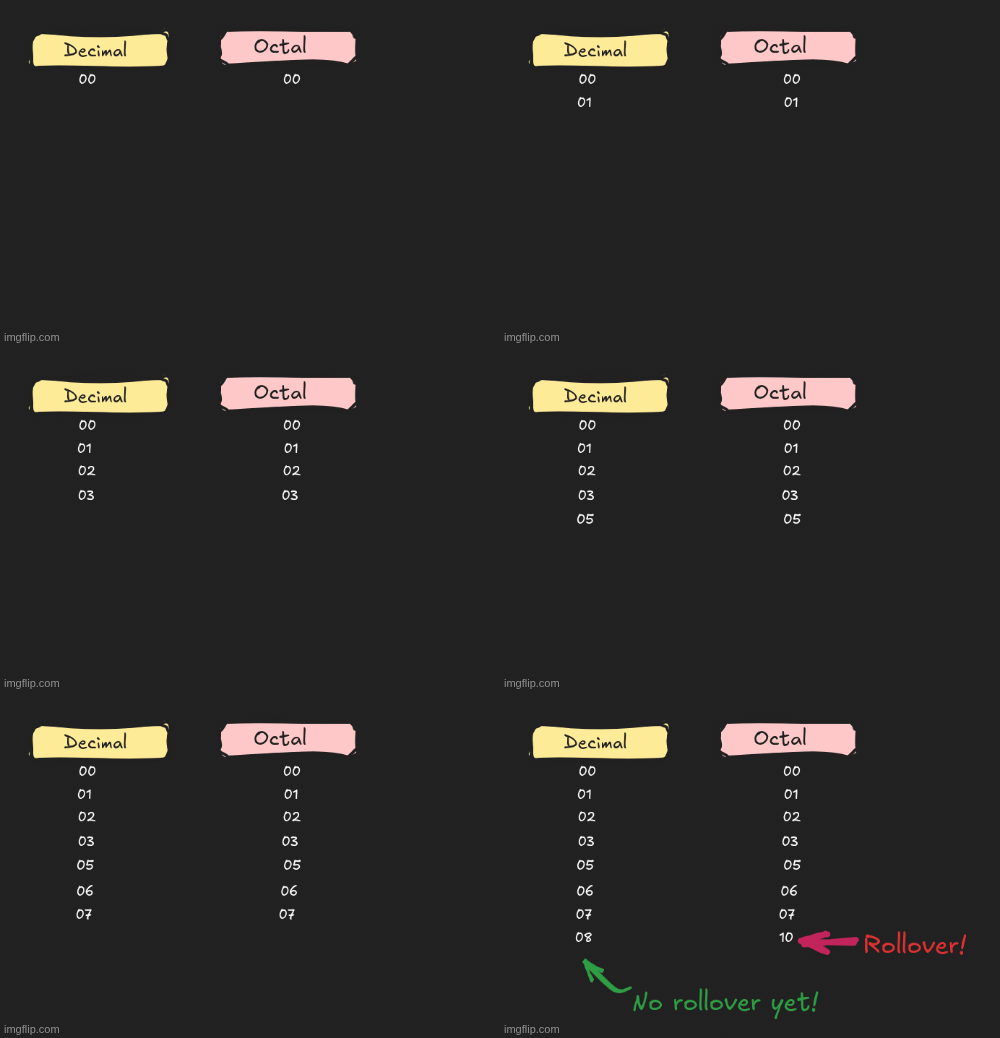
So now we understand that this rollover behavior is the defining feature of any positional number system. A base-N system can only use N distinct symbols (0 through N−1) before it must carry into the next column.
Positional Structure
A single octal digit is really just a compact label for a group of 3 bits. And why 3 bits specifically? Because with 3 bits, you can represent exactly 2³ = 8 different patterns, 000 through 111, which is exactly the 8 symbols (0–7) that octal needs. Every octal digit is actually one of these 3-bit patterns:
| Octal digit | 4 | 2 | 1 | Sum |
|---|---|---|---|---|
| 0 | 0 | 0 | 0 | 0 |
| 1 | 0 | 0 | 1 | 1 |
| 2 | 0 | 1 | 0 | 2 |
| 3 | 0 | 1 | 1 | 3 |
| 4 | 1 | 0 | 0 | 4 |
| 5 | 1 | 0 | 1 | 5 |
| 6 | 1 | 1 | 0 | 6 |
| 7 | 1 | 1 | 1 | 7 |
There is no 3-bit pattern left over for “8” or “9” as 000 through 111 only has 8 combinations total, and they’re all used up by 0–7. Now think about place value the same way. In decimal, moving one column to the left makes a digit worth 10× more, because decimal counts in groups of 10 and in binary moving one column to the left makes a digit worth 2x more, similarly in octal, moving one column to the left makes a digit worth 8× more, because octal counts in groups of 8. Lets take an example of the number 253. What if I told you the digits 2 5 3 weren’t written in decimal at all and were written in octal instead?
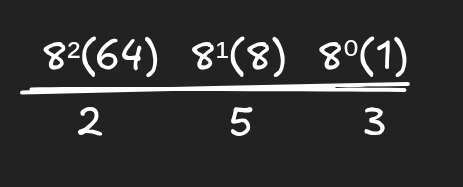
The digits 2, 5, and 3 themselves haven’t changed. But their job has changed. We know that in octal columns aren’t worth ones/tens/hundreds anymore. They’re worth:
- Right-most digit → ones (same as before)
- Next digit → eights (not tens!)
- Next digit → sixty-fours (not hundreds!)
So now watch what happens to the same three digits:
| Digit | Job in octal | Value |
|---|---|---|
| 2 | groups of 64 | 2 × 64 = 128 |
| 5 | groups of 8 | 5 × 8 = 40 |
| 3 | groups of 1 | 3 × 1 = 3 |
Add it up: 128 + 40 + 3 = 171
The key lesson here is that the symbols “2,” “5,” “3” never change meaning on their own. A digit is just a count. What changes is how much each position is worth, and that depends entirely on the base you’re working in. Read 253 as decimal, you get two-hundred-fifty-three. Read the exact same three symbols as octal, and you get one-hundred-seventy-one.
Lined up, the whole number 253 in octal is really just the bit string:
010 101 011
Hexadecimal (Base 16)
What is a Hexadecimal
Hexadecimal is a base-16 number system. It needs 16 unique symbols, but our familiar decimal digits only go up to 9 so hex borrows letters to fill the gap. A hexadecimal number can be expressed by placing a 0x before the number.
| Symbol | 0 | 1 | 2 | 3 | 4 | 5 | 6 | 7 | 8 | 9 | A | B | C | D | E | F |
|---|---|---|---|---|---|---|---|---|---|---|---|---|---|---|---|---|
| Represents | 0 | 1 | 2 | 3 | 4 | 5 | 6 | 7 | 8 | 9 | 10 | 11 | 12 | 13 | 14 | 15 |
So A isn’t a letter in the alphabetic sense here but it’s a single digit that stands for the quantity 10. Likewise F is a single digit standing for 15. Once you reach F, the next value rolls over to a new position that will be 0, just like binary rolling over after 1, octal rolling over after 7 and decimal rolling over after 9.
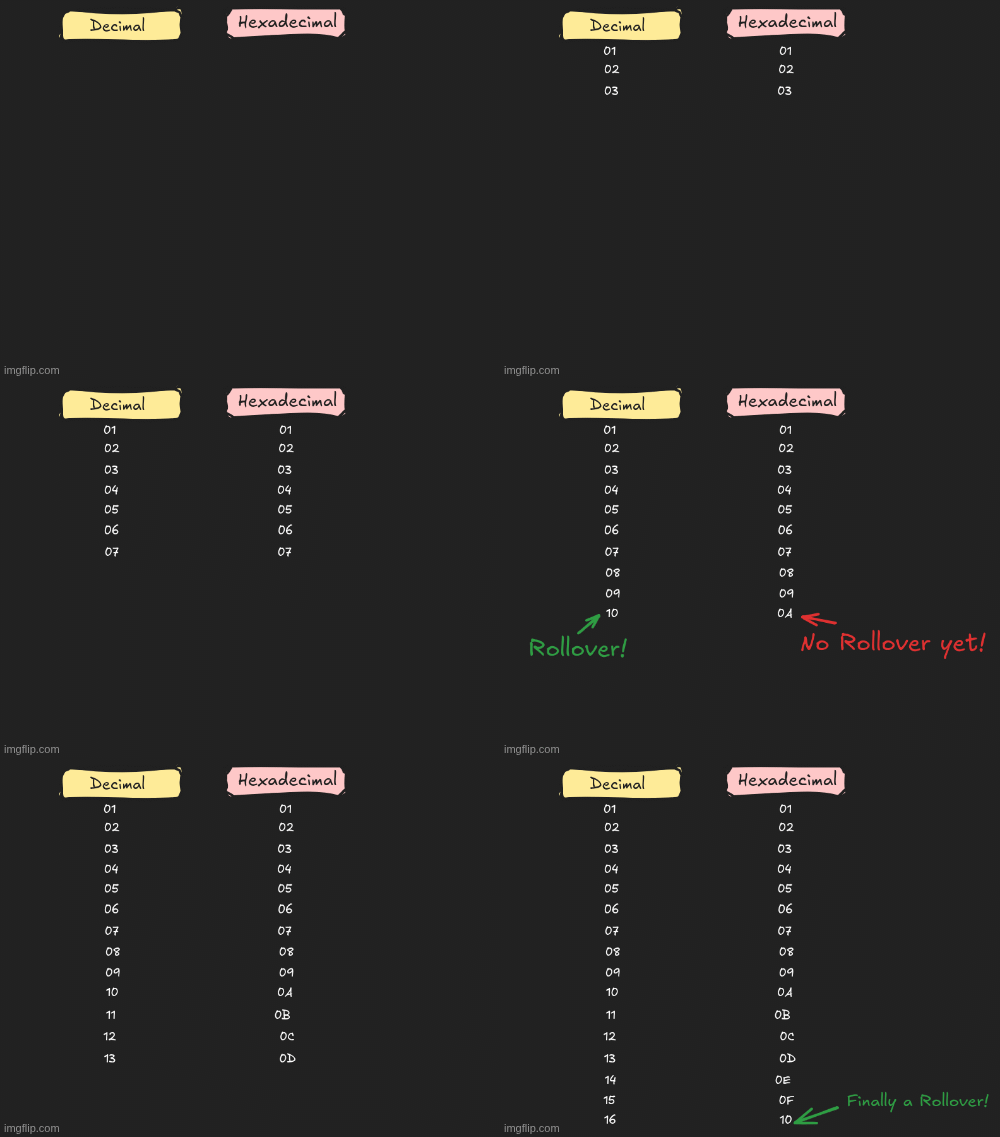
(In the above GIF 0 has been missed out but it does exist.)
Why 16 Symbols Are Needed
We know that a base-N system needs N distinct symbols to represent every value from 0 up to N−1 before a carry happens. Base 16 needs 16 symbols and had to invent extra ones hence borrowing A–F from the alphabet. There’s nothing special about using letters specifically. It is simply the most convenient set of extra single character symbols available.
Positional Structure
Hex places are powers of 16:
| Position (from right) | 4th | 3rd | 2nd | 1st |
|---|---|---|---|---|
| Power of 16 | 16³ | 16² | 16¹ | 16⁰ |
| Decimal value | 4096 | 256 | 16 | 1 |
The core idea is that every hex digit is just a nickname for a group of 4 bits (a “nibble”). There are 16 possible patterns you can make with 4 bits (0000 through 1111).
| Hex digit | 8 | 4 | 2 | 1 | Sum |
|---|---|---|---|---|---|
| 0 | 0 | 0 | 0 | 0 | 0 |
| 1 | 0 | 0 | 0 | 1 | 1 |
| 2 | 0 | 0 | 1 | 0 | 2 |
| 3 | 0 | 0 | 1 | 1 | 3 |
| 4 | 0 | 1 | 0 | 0 | 4 |
| 5 | 0 | 1 | 0 | 1 | 5 |
| 6 | 0 | 1 | 1 | 0 | 6 |
| 7 | 0 | 1 | 1 | 1 | 7 |
| 8 | 1 | 0 | 0 | 0 | 8 |
| 9 | 1 | 0 | 0 | 1 | 9 |
| A | 1 | 0 | 1 | 0 | 10 |
| B | 1 | 0 | 1 | 1 | 11 |
| C | 1 | 1 | 0 | 0 | 12 |
| D | 1 | 1 | 0 | 1 | 13 |
| E | 1 | 1 | 1 | 0 | 14 |
| F | 1 | 1 | 1 | 1 | 15 |
Let’s use the same three digits 2, 5, and 3, but now interpret them as hexadecimal. We know that in hexadecimal, each position is worth a power of 16, so:
- Right-most digit → ones = 16⁰ = 1
- Next digit → sixteens = 16¹ = 16
- Next digit → 256s = 16² = 256
So for 253₁₆:
| Digit | Job in hexadecimal | Value |
|---|---|---|
| 2 | groups of 256 | 2 × 256 = 512 |
| 5 | groups of 16 | 5 × 16 = 80 |
| 3 | groups of 1 | 3 × 1 = 3 |
Add it up: 512 + 80 + 3 = 595 So: 253₁₆ = 595₁₀
Now take any hex number say 0x9C.
Each digit just gets swapped for its 4-bit pattern:
9    C
1001 1100
Push them together and 0x9C is exactly the same value as the binary number 10011100. Nothing is lost or changed, just written two different ways.
Why Hex and Octal Are Basically “Compressed Binary”
We now know that binary numbers get long and hard to read fast. An 8-bit number is a sequence of eight 1s and 0s, and real computer values (e.g memory addresses) are often 32 or 64 bits. Nobody wants to read out a 64 bit sequence of 1s and 0s and keep track of which is which.
Hex fixes this because 16 is exactly 2 to the power of 4 (2×2×2×2 = 16). That means every possible combination of 4 binary bits (0000 through 1111) corresponds to exactly one hex digit (0 through F), with nothing left over and nothing overlapping.
Octal works the same way, except grouping in 3s, because 8 is exactly 2 to the power of 3. Why doesn’t this work for decimal? Because 10 is not a clean power of 2 (10 = 2 × 5, not 2×2×2…). There’s no way to chop binary digits into fixed size groups that line up perfectly with decimal digits like octal and hexadecimal.
Applications of Number Systems
All what we have studied till now isn’t just classroom material, you’ll run into these constantly:
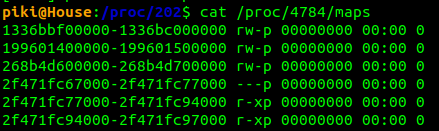
- Hex in memory addresses. Every pointer or memory address you’ll see in a debugger (like
0x7ffee420) is hex, purely because it’s a compact, exact way to write out a binary address without a 32- or 64-character sequence of 1s and 0s.
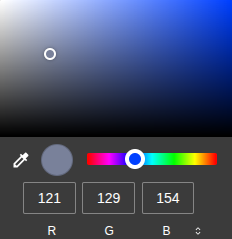
- Hex in color codes. A web color like
#FF5733is three hex bytes one each for red, green, blue intensity, 0–255 each.
- Octal in Unix permissions. Chmod in Linux is used to change file permissions.
chmod 755is octal. Each digit (7, 5, 5) is exactly 3 bits representing read, write and execute permissions for owners, groups and others.
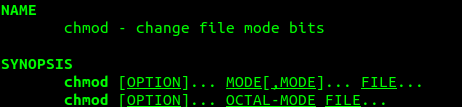
You can see how chmod asks for an OCTAL-MODE for permissions.