Number Systems Basic Arithmetic Operations
Arithmetic Operations in Number Systems is a very important topic as we will often come across different number system operations during our learning journey. We are already deeply familiar with Decimal arithmetic operations, but now lets familiarize ourselves with the basic arithmetic operations involving Binary, Octal and Hexadecimal.
Binary
Binary Addition and Subtraction seems to be a bit complex when done for the first time, but all you have to do is build intuition, and once that is done the arithmetic operations involving the remaining two number systems also gets really easy to understand. This post will build that intuition using the same logic you already know from everyday decimal math.
1. First, Let’s Remember How Decimal Works
We know that when we count in decimal and hit a 10 and run out of single digits , we simply reset the current column (units column) to 0 and add 1 to the column on the left (the “tens” column). This “rolling over” behavior is called carrying, and it is the main concept we are going to need to understanding binary addition.
By now we know this very well that binary (base 2) works exactly the same way, except instead of 10 symbols (0–9), it only has a 0 and a 1. So when we are counting in binary and reach the point where we will need a 2, we are out of symbols, and have to carry, exactly like decimal rolling over from 9 to 10.
Let’s count in binary and watch it happen:
| Decimal | Binary |
|---|---|
| 0 | 0 |
| 1 | 1 |
| 2 | 10 |
| 3 | 11 |
| 4 | 100 |
| 5 | 101 |
| 6 | 110 |
| 7 | 111 |
| 8 | 1000 |
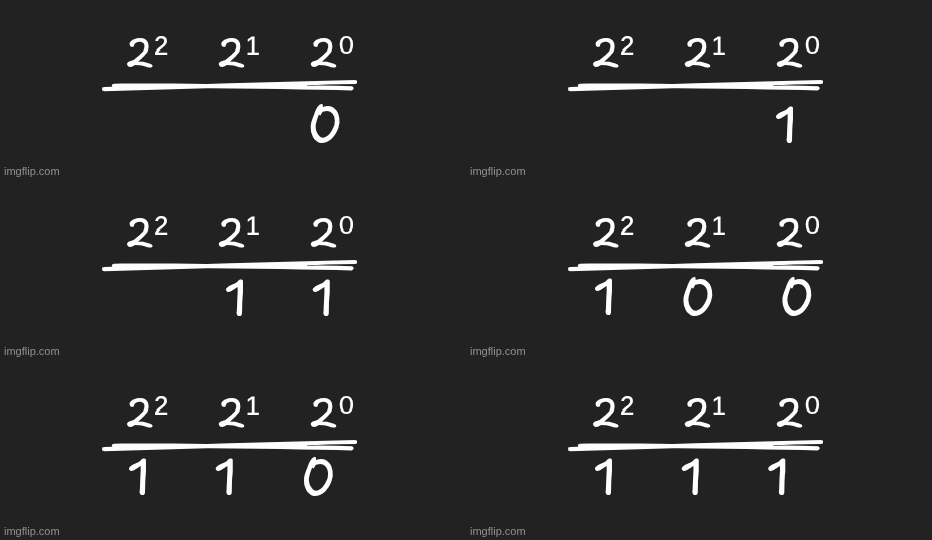
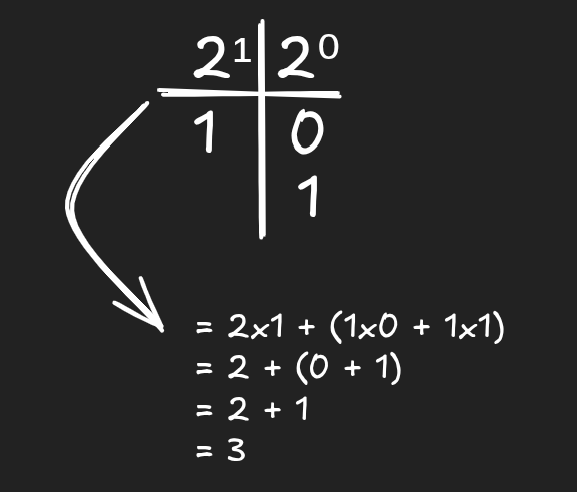
Notice as soon as we hit 2 binary rolled over to 10. In binary we know that each column represents a power of 2:

So the binary number 1 0 1 means: (1 × 4) + (0 × 2) + (1 × 1) = 5. Let’s add using the “ones” column:
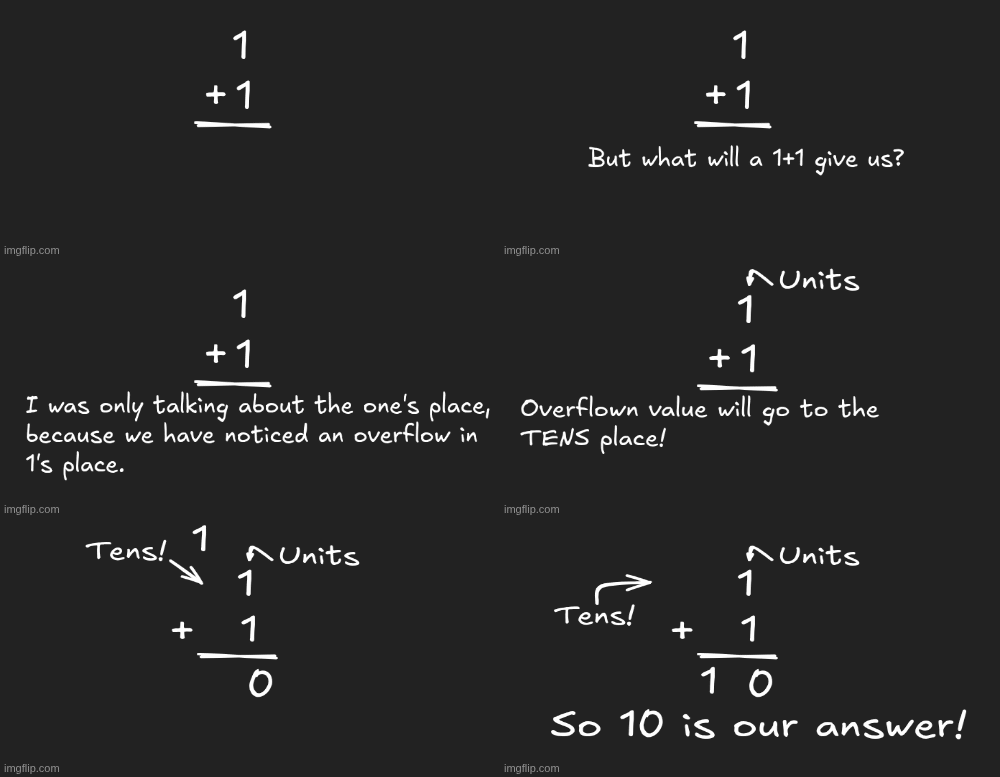
Here’s the step-by-step logic for this operation:
- Add the ones column: 1 + 1 = 2 (as a quantity)
- Binary has no digit for two, so we write 0 in ones column
- We carry a 1 to the next column (the 2s column)
- The 2s column had nothing in it, so it becomes 1
Result 10which means (1 × 2) + (0 × 1) = 2.
5. Why Does 1 + 1 + 1 = 11?
Let’s build on what we just learned. We’re adding three ones:
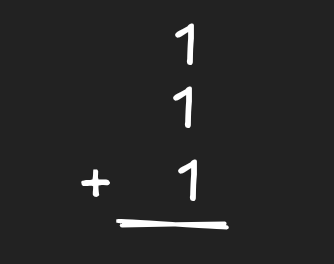
Think of it as a running total, one 1 at a time:
- Start: 0
- Add first 1 → total is 1 (binary:
1) - Add second 1 → total is 2 (binary
10, as we just proved) - Add third 1 → total is 3
Now here’s where it gets interesting. Let’s add the third 1 to 10:
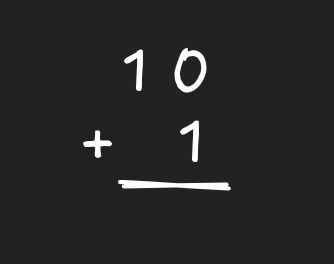
Line up the columns:
- Ones column 0 + 1 = 1. No carrying needed here so write 1.
- 2s column just bring down the 1 (nothing added there).
Result: 11
So 1 + 1 + 1 = 11 in binary because 11 (binary) represents the quantity three, using one “2” and one “1.”
Similarly if we try 1 + 1 + 1 + 1. We know 1 + 1 + 1 = 11 (which is 3). Now add one more 1:
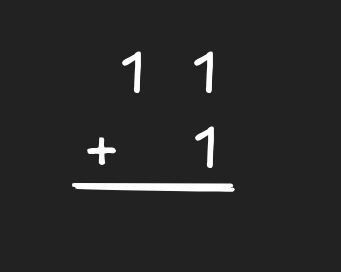
Line up columns:
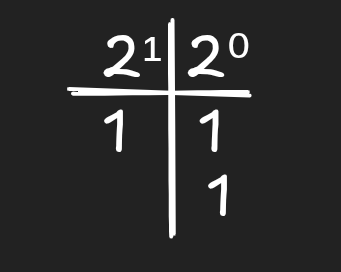
Step 1: Ones column: 1 + 1 = two. No symbol for two, so write 0 and carry 1 to the 2s column.
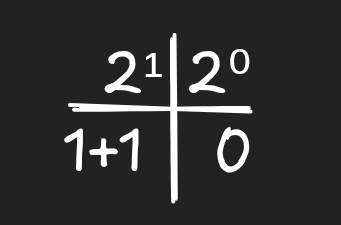
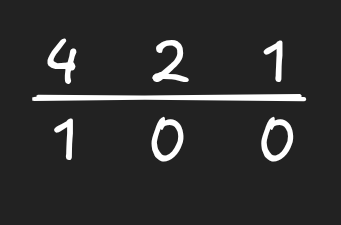
Step 2: In 2s column we already had a 1 sitting there, and now we’re adding the carried 1. So 1 + 1 = two again, but this time it’s two 2s, which equals one 4. No symbol for two in this column either! So we write 0 here too, and carry a 1 into the next column (the 4s column). This is where a double carry shows up for the first time.
Step 3: In 4s column nothing was there before, so the carried 1 just lands here.
Putting it all together:
Result: 100
Let’s double check 100 in binary = (1 × 4) + (0 × 2) + (0 × 1) = 4. Whenever we add two bits, there are only four possible cases and this is the entire binary addition table:
| A | B | Sum | Carry |
|---|---|---|---|
| 0 | 0 | 0 | 0 |
| 0 | 1 | 1 | 0 |
| 1 | 0 | 1 | 0 |
| 1 | 1 | 0 | 1 |
When we have a third number to add into a column (like a carry-in from the previous column), we get one more case:
| A | B | Carry-in | Sum | Carry-out |
|---|---|---|---|---|
| 1 | 1 | 1 | 1 | 1 |
Binary Subtraction
Binary subtraction works in the same way as decimal subtraction. For a single column, there are four cases:
| A | B | A - B | Borrow |
|---|---|---|---|
| 0 | 0 | 0 | No |
| 1 | 0 | 1 | No |
| 1 | 1 | 0 | No |
| 0 | 1 | 1 | Yes |
All the cases are pretty straightforward as we have already encountered them in decimal subtraction. In the fourth case, we can’t subtract 1 from 0 in that column alone, so we have to borrow from the next column to the left. When we borrow one unit from the next column, it’s worth 2 in our current column, because each column is double the one to its right. So:
0 (borrow) becomes 2, and 2 - 1 = 1.
That’s the entire trick of binary subtraction.
3. Why Does 10 - 1 = 1?
Let’s work through it column by column. Remember, 10 in binary means the decimal value 2.
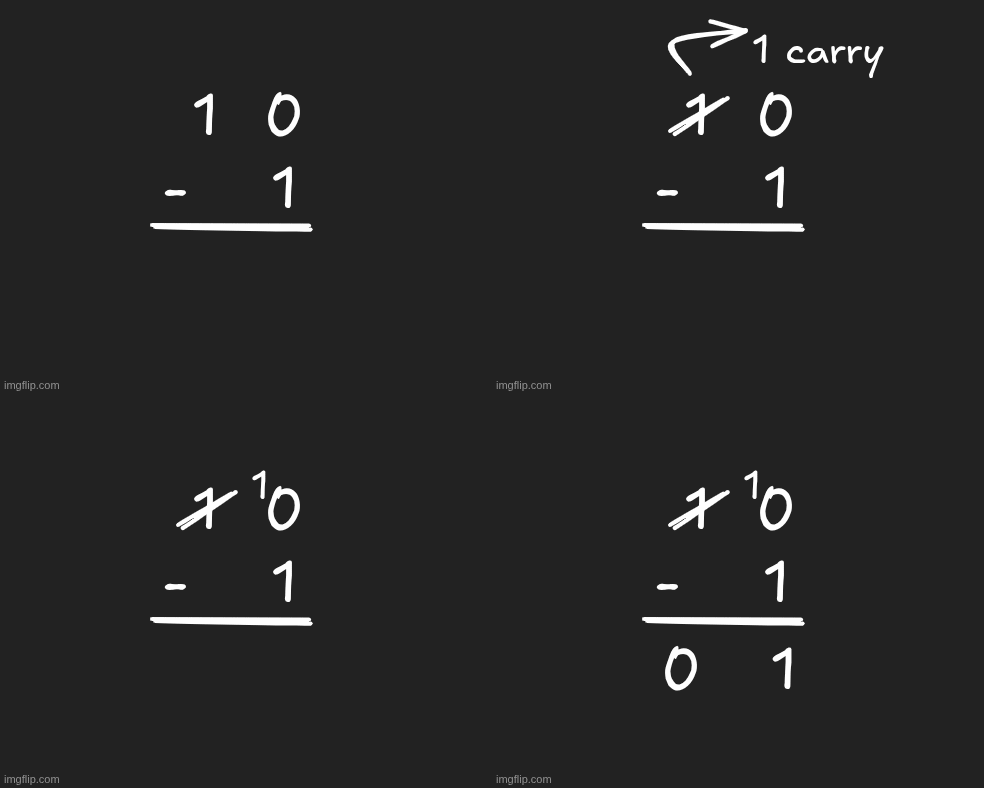
Ones column: 0 - 1. We don’t have enough here, so we borrow from the 2s column.
- Borrowing turns the 2s column’s
1into0. - The borrowed value becomes 2 extra ones in our column, so our 0 becomes 2.
- Now: 2 - 1 = 1. Write 1.
2s column: After lending out its 1, it’s now 0. So: 0 - 0 = 0
1. What Is Octal, Really?
In our previous lecture we learnt that an Octal is base 8 which means it only has eight symbols: 0, 1, 2, 3, 4, 5, 6, 7. There is no digit “8” in octal. Once you count up to 7 in a column and need to go one more, you run out of symbols and must take a carry. Let’s go beyond 7 in octal and watch the rollover happen:
| Decimal | Octal |
|---|---|
| 0 | 0 |
| 1 | 1 |
| 2 | 2 |
| 3 | 3 |
| 4 | 4 |
| 5 | 5 |
| 6 | 6 |
| 7 | 7 |
| 8 | 10 |
| 9 | 11 |
| 10 | 12 |
| 15 | 17 |
| 16 | 20 |
Notice as soon as we hit decimal 8, octal ran out of symbols and rolled over to 10, one “eight” and zero “ones.”
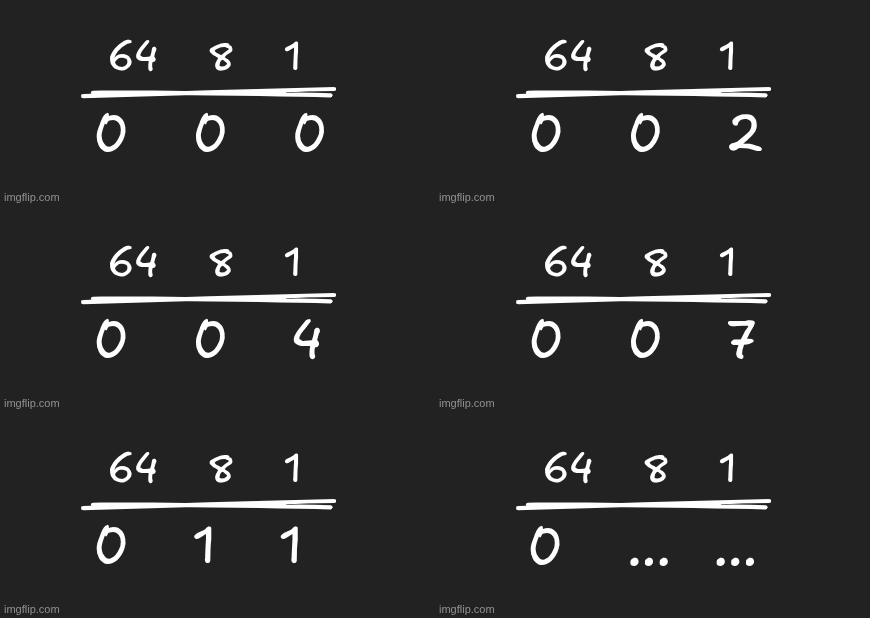
2. Place Value in Octal
We now also know that just like decimal columns are powers of 10, and binary columns are powers of 2, octal columns are powers of 8:
This is the whole key to everything that follows, whenever a column’s sum reaches 8 or more, it “overflows” its single digit and you carry because 8 is exactly the value of the next column over.
3. Octal Addition: The Core Rule
When adding two octal digits, if the sum is 7 or less, just write it down as it is, but if the sum is 8 or more, you can’t write it as a single octal digit since the highest one is 7 so:
- Subtract 8 from the sum (this is what “carrying” removes)
- Write down the remainder
- Carry a 1 to the next column to the left
Example 1: 5 + 6 (in octal)
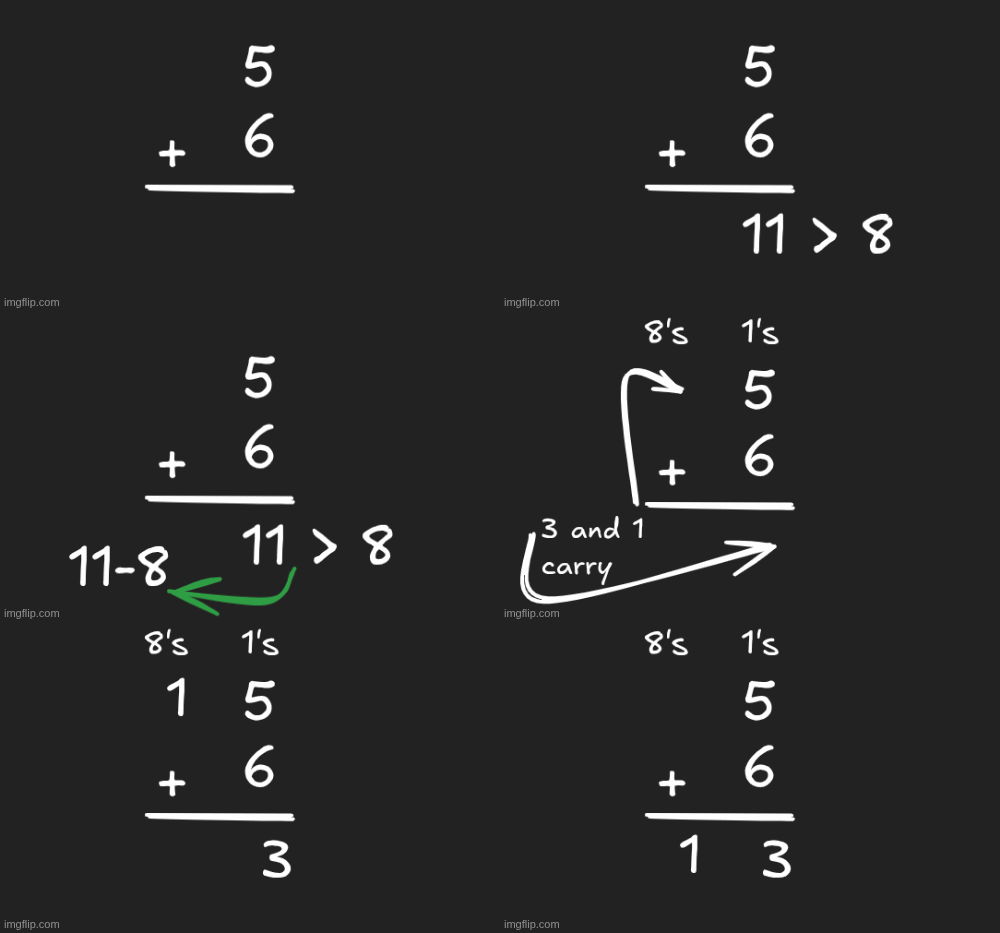
5 + 6 = 11 in decimal terms. Since 11 is 8 or more, we can’t write it directly:
- 11 - 8 = 3 → write 3
- Carry 1
Result: 13 (octal)
4. Octal Subtraction: The Core Rule
Subtraction is as simple as addition, but here we are borrowing instead of carrying. If the minuend is smaller than the subtrahend, you can’t subtract directly, so you borrow 1 from the next column left. That borrowed 1 is worth 8 in your current column (since each column is 8 times the one to its right).
Example 1: 13 - 6 (in octal)
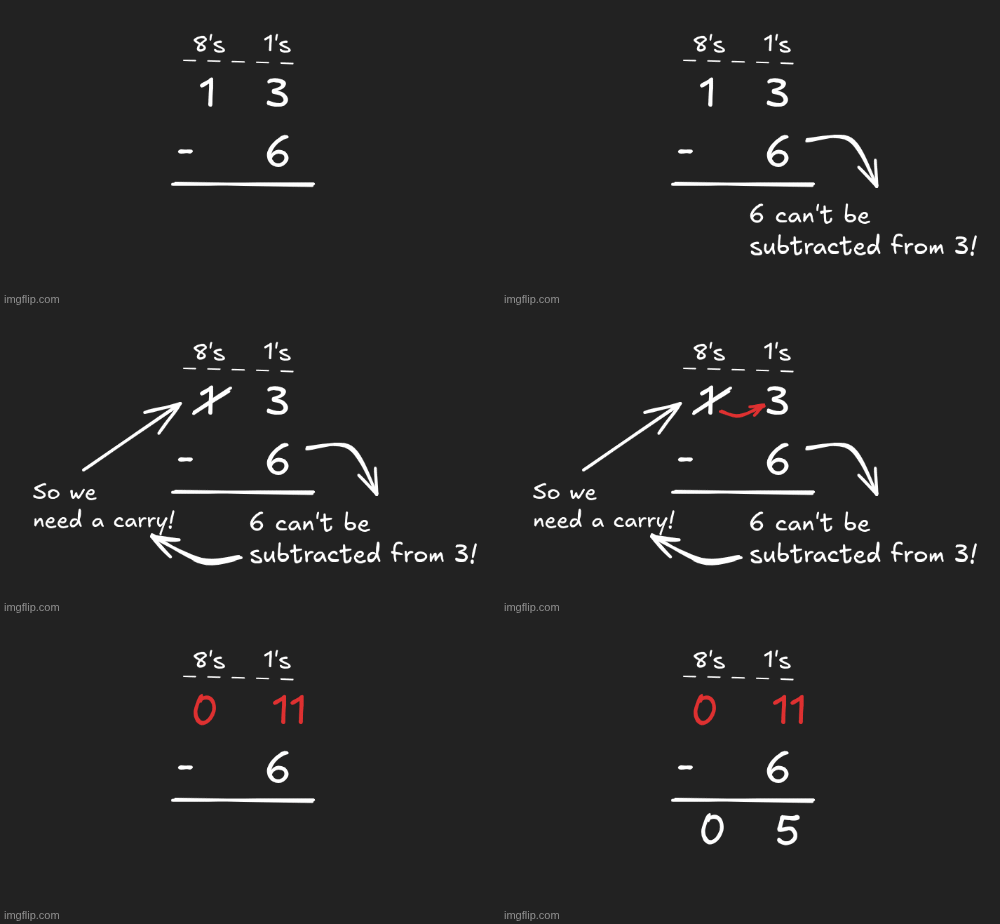
Ones column: 3 - 6. Not enough so borrow from the 8s column.
- The 8s column’s 1 becomes 0.
- Our ones column becomes 3 + 8 = 11.
- 11 - 6 = 5. Write 5.
Result: 5
Hexadecimal Addition and Subtraction Explained (With a Binary Connection)
Now let’s tackle base 16 which is hexadecimal which means it needs sixteen symbols for a single digit from 0 to 9 and then A to F. There is no digit “16” in hex. Once a column needs to represent sixteen, it has run out of symbols and must carry just like we’ve seen till now.
Right at decimal 16, hex ran out of single digit symbols (F was the highest) and rolled over to 10 meaning “one sixteen and zero ones.”
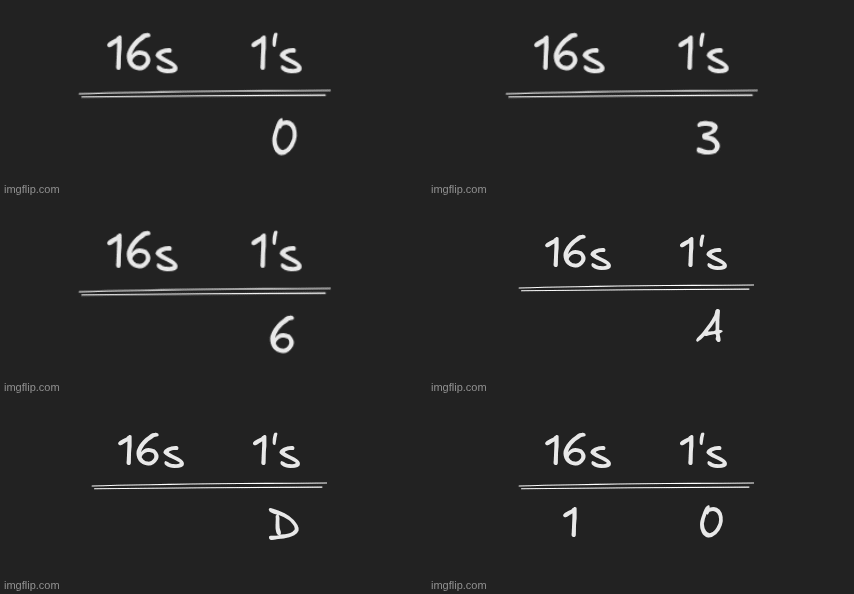
Exact same rollover behavior as every other base, just triggered at 16 instead of 10, 8, or 2!
2. Place Value in Hex
Just as decimal columns are powers of 10, and octal columns are powers of 8, hex columns are powers of 16:

So the hex number 2 A 5 means: (2 × 256) + (10 × 16) + (5 × 1) = 512 + 160 + 5 = 677 (decimal). Notice the A is actually 10.
3. Hex Addition: The Core Rule
Add two hex digits and convert letters to their decimal values as needed. If the sum is 15 or less, write the corresponding hex digit directly. If the sum is 16 or more, you’ve overflowed the single digit, so you:
- Subtract 16 from the sum
- Convert the remainder back into a hex digit if it’s 10 or higher
- Carry 1 to the next column left The same steps as always!
Example 2: B + 7 (in hex)
B is 11 in decimal, so:
11 + 7 = 18 (decimal). Since 18 ≥ 16:
- 18 - 16 = 2 → write 2
- Carry 1
so the result is 0x12. Now lets take a bit more complex example to make our concepts crystal clear:
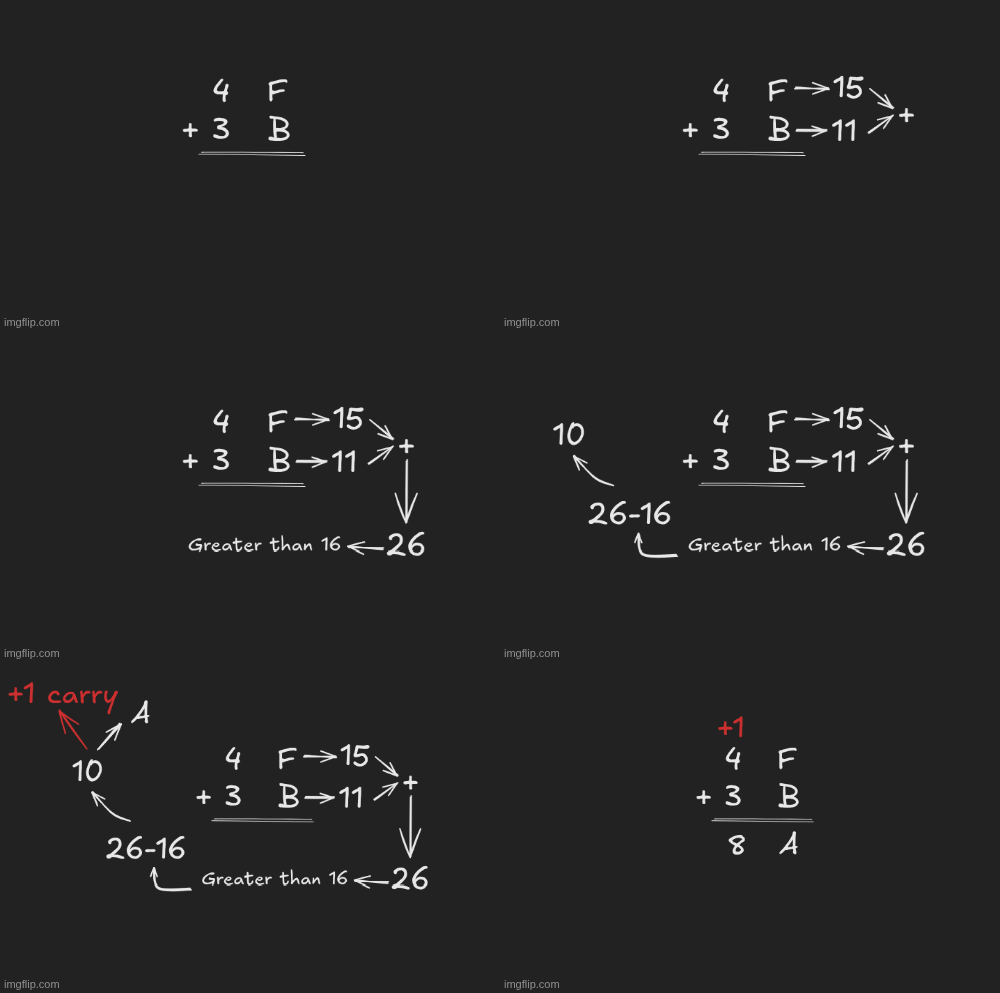
Ones column: F (15) + B (11) = 26 (decimal). Since 26 ≥ 16 so 26 - 16 = 10. So write A, carry 1.
16s column: 4 + 3 + (carried 1) = 8. Since 8 < 16, just write 8.
Result: 0x8A
4. Hex Subtraction: The Core Rule
Here we again follow the same borrowing idea as before, if the minuend is smaller than the subtrahend, borrow 1 from the next column left. That borrowed 1 is worth 16 in the current column.
Example 1: 12 - 7 (in hex)
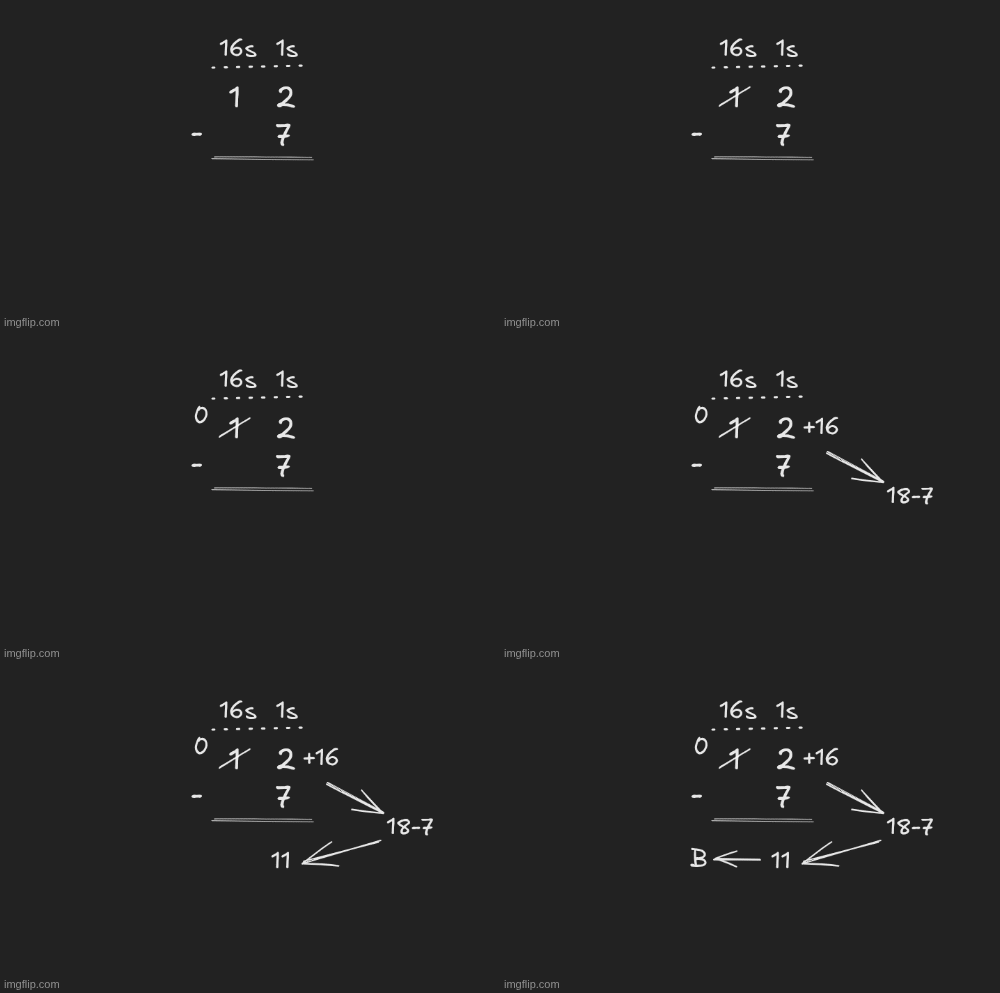
Ones column: 2 - 7 is clearly not enough, so we borrow from the 16s column.
- The 16s column’s 1 becomes 0.
- Our ones column becomes 2 + 16 = 18.
- 18 - 7 = 11 and that’s a B. 16s column: 0 - 0 = 0
Result: 0x0B